


We look at what you can do to get things working if you can’t live stream to Facebook. Facebook Live is great when it works with a free streaming service for video at up to 1080p. Outages are rare but do happen occasionally.
Important information March 2024 – There have been some significant changes to Facebook Live for Pages and Groups. This may mean that you cannot stream at all to your Pages or Groups.
This is a major problem with the entire platform including RTMP and API integration from streaming hardware and software.
Currently the advice we are seeing is that if you can’t stream to Facebook then stream to a different platform such as YouTube Live and paste a link into your Facebook Page or Group. There are other paid service providers including Vimeo and DaCast.
–
The first thing you must do if you are using a streaming solution using the Facebook API is check the status of the platform.
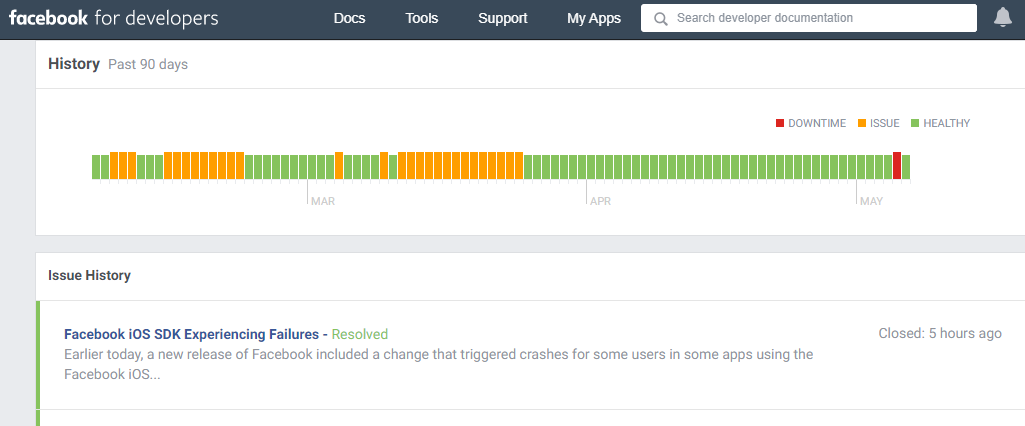
Here is the link to the Facebook for Developers Platform Status
https://developers.facebook.com/status/dashboard/
Note – if you are using RTMPS rather than the API it might still be worth checking the Dev Platform link as there may be wider issues that apply to both the API and manual streaming.
Note 2 – Failures using Facebook’s Live API are notably frequent throughout 2020 and into 2021. It’s not always clear if the problem is poor implementation by 3rd party developers or due to failures and/or updates by Facebook themselves. Sometimes security updates require users to re-associate their account. This can be as simple as logging out then back in to Facebook on the device or software running the API.
If the Developer Platform Status is clear then before spending too much time trouble shooting your own setup hop onto Google and Twitter to check for Facebook outages.
If there’s a major problem with the platform (which may also affect Instagram and WhatsApp) then you probably need to look at the alternative options further down this page. Note: Facebook itself may still work but the live streaming feature could be down altogether, just API or just manual RTMPS streaming.
In 2022 we started to see some really huge outages in other services including Amazon Web Service (AWS) and Cloudflare that had an adverse effects on many other parts of the web. Facebook, your own internet service provider and many other web infrastructure providers are interdependent. So it’s fair to say that Meta/Facebook themselves have no faults but users may not be able to use their services because of a 3rd party problem.
Live Streaming from a Web Browser
The most simple way to go live on with video online using a computer is using your Internet browser with either a webcam or a UVC video capture device such as a Blackmagic ATEM Mini.
You must give your web browser permission to access your camera and microphone or it won’t work. if you’ve previously blocked access then you will need to allow it. Check the browser bar area for notifications.
If you see and unsupported browser message when trying to go live then it could be that you simply need to try a different browser. If you switch from Chrome to Firefox and it works then that may resolve the problem.
It might be that either the browser developer or that the platform itself need to update code at their end to resolve the issue for users. It’s unusual for a problem like this to persist for long with current browsers and operating systems. If you’re using an older operating system that is no longer updated then you may find that it’s time to upgrade.
Check your kit – it may need an update
Some users don’t update their live streaming equipment in a regular basis – using old versions of software or firmware can leave you with an incompatible version that won’t work. Always check for software or firmware updates that may be required to restore connectivity to Facebook Live.
We are now at a stage where some hardware and software is old enough to be incompatible with direct streaming to Facebook Live. Make sure your software or device is capable before doing anything else.
It’s good practice to keep your systems up to date. Most firmware updates are free but at some point manufacturers have to give up on older hardware. Software developers will usually patch current releases but if you’re running an older version then it may get left behind forcing you to upgrade.
API – Paired Encoders and Software
The API or Application Programming Interface is a function that allows Facebook Live to be integrated into streaming hardware or software. Examples of this are VidiU hardware encoders and software such as vMix.

The API does some behind the scenes work to help make setting up and managing live streams to Facebook easier for the user. Facebook make changes to their live API on a regular basis. Most API changes are well publicised with adequate time for developers to update their devices or software before the changes are rolled out. However, this doesn’t always mean that updates work first time, every time, leaving programmers rushing out fixes to users.
We are seeing more instances of the API system itself becoming faulty – either on a regional or global level. If you find the integrated Facebook settings in your hardware or software is not working then try setting up a manual stream using RTMPS and a stream key instead.
Note some devices like the Epiphan Webcaster X2 do not directly support RTMPS and will only work with Facebook via the API or using a 3rd party restreaming service like Switchboard Cloud.
RTMPS – manually streaming directly to Facebook
This is essentially the old fashioned way to go live on the Internet. It doesn’t rely on an API working and to be honest is our preferred way of working across all platforms.
Setting up a live stream manually is not as difficult as it may sound. You need two bits of information to configure the stream.
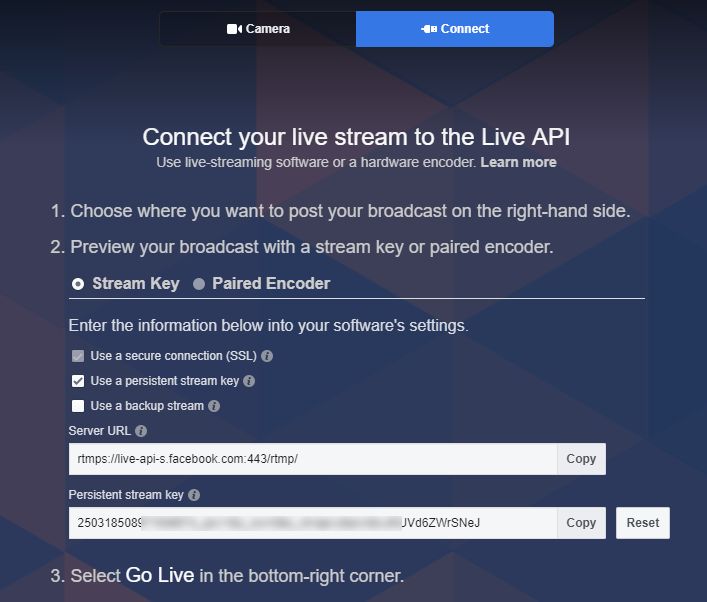
The RTMPS URL is Facebook’s server address – this is usually the same for any stream you send. The Stream Key is a dedicated “password” for your Facebook Page or Group. Personal accounts like the screenshot above have a persistent, re-usable key but Pages and Groups generate a fresh key each time you go live.
You can generate these by using a web browser in Facebook – select the Go Live option. When the web page headed “Camera” opens click the “Connect” option.
You can also schedule an event in publishing tools – it’ll take you through the setup options and provide an RTMPS and Stream Key.
Enter the address and stream key into your streaming software or hardware. Facebook doesn’t need any authentication right now so you can ignore any additional entries/check boxes that you may see.
Once you start streaming you’ll see a preview in the browser. At this point you are not live. Press the red Go Live button in the preview windows when you’re ready to actually go public.
API and RTMPS not working – try YouTube
If both the API and RTMPS are not working then consider streaming to an alternative service and posting a link to the video on the other platform into your Page feed.
YouTube offer a really good, free streaming service. You can go live on YouTube – view the public stream on YouTube and copy a link to the live video. Paste that link into your Facebook Page. You won’t get the same interaction with viewers comments etc but at least people will be able to see the stream while live. You aren’t limited to YouTube Live – if you have Vimeo Live or any other CDN such as DaCast then you can paste a link to that also.
Upload the recorded version afterwards
Upload a local recording (or a rip from YouTube) once the event has finished. This will be visible on Facebook natively and viewers can comment, like and share. Not as good as live but better than missing it altogether.
Once Facebook Live is back up you could stream a recording of the event as if it were live using vMix or OBS etc but make it clear in the description that it’s pre-recorded. This will support the same interaction as a real live stream with comments from viewers as the event progresses.
Why does Facebook Live go down?
Facebook Live is a free service for users. It’s paid for by advertising in much the same way as YouTube Live. In general both services are very reliable but from time-to-time there may be outages.
Global outages of the entire Facebook Live platform are rare but do happen. The API might throw a wobbly (see reasons above) but sometimes the manual RTMPS option works fine. Regional outages are more common with certain users unable to go live depending on where the outage occurs.
It’s not me it’s you
Being unable to go live is not the same problem as viewers being unable to view your Facebook Live feed properly. Invariably somebody somewhere will have trouble watching a live stream and raise a complaint. 99 times out of 100 it’s a problem at the viewer end – either user error, faulty equipment or a poor connection. Often a simple browser refresh restores normal service.
CDNs or content delivery networks use localised servers to relay content around the Internet. Think of it like a mesh or patchwork quilt around the globe. If part of the mesh is damaged then viewers in that area may see a much lower quality version, playback issues or no feed at all.
We recommend monitoring all streams locally on a separate computer/tablet etc to see and hear the public feed for yourself. If it’s working well for you but somebody in the comments is complaining then you can rest easy that the problem is not with your stream.
I am trying to find out why neither one of my devices will go live on facebook, though we have been going regularly live each Satruday for the past 4 weeks. What happened? I click on camera and get this message: The browser you’re using doesn’t support the camera feature in Live Producer. Update your browser and download the latest beta version of Chrome here or use Firefox to go live. As a reminder, Live Producer is not fully supported in Safari, Internet Explorer, or older versions of Edge. I downloaded the new Chrome Beta and it didn’t fix it. What happened?
Hi Christine,
I’ve never used the browser to go live. We always use manual RTMPS or streaming software/hardware with Facebook API integration.
Is say the Beta version of Chrome may not be the best idea given it is a Beta and may not identify itself to FB as a compatible browser.
Firefox is pretty good and would be worth trying.
You may want to look at live streaming software. There’s lots of choice from free (OBS) to paid Wirecast, vMix etc. The paid software tends to be better integrated with streaming services like Facebook or YouTube making setting up your live streams very easy.
Streaming software also gives you the ability to set a constant quality and make a recording locally. When you go live from the browser the quality can vary plus you don’t get a local recording.
Gavin
Christine,
Sorry I don’t have an answer – but I experienced the exact same issue this morning. After several weeks of successful live streaming using Chrome – this morning (10th May) it is no longer working. May be an issue with FB.
I’ll investigate streaming software.
Hi Alan,
Thanks for your comment. At the time of writing this (11 May 2020) there has been an issue when going live on Facebook from within the Chrome browser using the simple ‘Go Live’ option with a webcam or a emulator devices like the Blackmagic Design Web Presenter. We have seen a lot of discussion on user groups and forums over the weekend about this issue. We have also seen traffic to this page increase 5 fold in recent days.
It’s something to be aware of and I will update the article to cover potential browser issues.
Gavin
Gavin – thanks for your response. Much appreciated.
Alan
Thank you. I have been going live every weekday for over 2 months. So today, May 11th, it says my Chrome browser needs to be Beta. But I could not download that. Up until today it has worked easily every day.
Thanks for your comment Chris. Hopefully either Google or Facebook will resolve it soon.
Gavin
The browser you’re using doesn’t support the camera feature in Live Producer. Update your browser and download the latest beta version of Chrome here or use Firefox to go live. As a reminder, Live Producer is not fully supported in Safari, Internet Explorer, or older versions of Edge.
But my app is updated. so what should I do?
Hi Nur,
Thanks for your comment. We’ve tested the current versions of Chrome and Edge (Chromium Edge). We don’t see the error message you see but plenty of other people are reporting the same thing.
We never really use the browser to live stream but having tested it today we found it doesn’t work for us. No error messages but we can’t go live. It shows our webcam image then when the press the ‘Go Live’ button the image turns black an no stream starts.
Clearly there is an ongoing issue with Facebook Live Producer. It is still possible to Live Stream to Facebook with OBS for free. There is a small learning curve but lots of free tutorials online.
Gavin
I am Experiencing the same incompatible browser response to Facebook live producer and would like to be kept up in this thread so that if there’s a correction I can benefit from it as well. I’ve used this for over eight weeks now on a five or seven day basis I’m not sure why this week I’m having problems. thank you
Just to add to my early comments – I have now installed Firefox and Facebook live is working with this (after authorising camera/microphone use on the site). Not ideal – but it is a work around.
Alan
Thanks Alan,
Good to know Firefox is working for you.
Gavin
I have had the same issue with Facebook LIVE and Chrome…and being able to access the camera (c922 Logitech). Like the others, it worked fine UNTIL it did not …and that what Wednesday, May 13, 2020.
I am posting to stay updated.
This is my problem: I have a new private Group for work. I have add my colleagues has admin. I am able to go live, but they can’t. When they open the “Live” option, the live producer doesn’t load, it’s a blank page. I’ve check the settings and all, and I don’t understand why. Can someone tell me how to fix this? Yes they are using Chrome.
Thank you!
Hi Jeana,
Thank you for your comment.
At this point I would recommend that you try Firefox browser. If that works then perhaps your users can install that as well. I know it’s inconvenient but may help until the issue is resolved.
Gavin
Same problem. However I originally used Firefox it stopped working even after I authorized my camera to be used by Facebook in Firefox
So I switched to Chrome and it worked find for the last 2 months. It stopped working last week. I have the same error that I need to download Google Chrome Beta. Which I am unable to do. I guess I will switch to OBS unless you or someone else finds another solution.
Hi Erika,
Thank you for your comment. Have you tried the current version of Firefox?
It’s fairly certain that Chrome and/or the Facebook browser integration in Chrome is currently broken. My guess would be that somebody tightened up a security issue and broke it. Google have done some version skipping recently to rush out some fixes.
OBS will provide a lot more flexibility with a reasonable learning curve. It had some quirks that cause occasional issues for some users but overall it’s free and difficult to complain about for that reason. vMix on Windows is a much more robust and powerful solution but it’s not free.
Gavin
I have created a new facebook account. With this facebook account I cannot do live video on my laptop. But if I logoff and login with my new account live video is working fine.
Any solution?
Sorry, login with old account live video working but new account live video not working.
With a new account there is potentially some qualifying period before FB will allow live streaming. I know YouTube have similar restrictions with fresh accounts.
Gavin
Thank you for the clarification.
I run a FB page for our Churcha and we use this to stream live services during lockdown. We have 4 people set up as administrators on this page, 3 of us can post Live without issue but one when then does not have the “Live” option when they go onto this page. We know that the devise they are using works fine and has the up to date brouser to allow Live as we have tested this with another user with admin rights to this page. it is a mystery – any suggestions anybody??
Hi Andrew,
It is unusual. Are they using the same computer and browser as the other 3?
Gavin
Have you ever heard of this happening…. so I record let’s say a 10 minute video, and when it posts to Facebook it’s reduced to a one or two minute video and the frames are sped up like it’s on Fast Forward until the end. I’m doing the exact same thing as my friends are doing but its working smooth for them. Same thing on YouTube if I record a 5 minute video it will post as a 1-minute video in fast forward like mode and then the end like a blur with jibberish audio. Wasnt able to explain it to Google to find a similar response or problem. maybe missing something or a setting?? any feedback would be greatly appreciated I’m trying to stream screen record from DJI go 4 drone app on wifi close to modem with galaxy s10 . Ive also tried stream key and link. Thank you for your time have a good day.
Hi Trevor,
You need to do some controlled tests. WiFi is always a risk with live streaming. The router must be capable of sending a continuous unbroken data stream.
Free routers from your ISP are not always capable enough. There are two different types of WiFi. 2.4Ghz and 5Ghz. If you have no choice but to use WiFi then try to use 5Ghz if you can. It is much faster but has a shorter range.
If you have a basic router with 2.4Ghz WiFi only then you may struggle (it can work but isn’t ideal).
If you’re downloading or uploading a file it doesn’t matter if the signal is in fits and starts – the file will still get where it needs to be. However, a video live stream needs to be uninterrupted.
Upload speed is critical to live streaming. Regular ADSL broadband is not capable of live streaming video properly. The data rate (upload speed) is often too slow – around 512kbit/s or at best 1mbit/s.
You must be on a fiber connection with at least 4mbit/s upload (preferably around 10mbit/s) to have any chance of a decent live stream. Run some tests on you network speed to check what it is achieving.
Gavin
I have been streaming video games and I have a problem with my Facebook where when I click go live although I have been streaming everyday for the past 23 days it takes me to the create a live stream page and then every time I click on create a live stream it just loads me back into the same page Over and over again and won’t let me go to the live producer page anybody have this problem or a solution for this problem?
Hi Cody,
I haven’t seen that but it’s always worth trying a different browser.
Gavin
Im getting the login page when i want to stream a stream from a browser and won’t show me the stream but Facebook login can someone help me with that thanks
Hi Chris,
Thanks for your comment. I can’t give specific tech support. The general advice would be to try a different browser.
Gavin
I can go live, but I can’t invite anyone..any suggestions?
Hi Earl,
Thanks for your comment. You may have the stream privacy set to ‘Only Me’. Essentially this would be a private stream. If it’s set to ‘public’ then I’m not sure why you cannot invite other people to view.
Gavin
using google chrome with facebook live streaming . Have a recognize webcam . Camera and microphones autorized for facebook live. It works for a 1 hour or two…. then video stops after a few seconds and I get unable to start video message. Have a little blue circle on left side of facebook live streaming page. I see a few of my friend who have no problems with facebook live streaming. My internet connection is good… Dont really know what to do…
Hi Rejean,
Thanks for your question. It does seem likely to be a connection issue. Are you on WiFi or Ethernet? Is it your own network or a public WiFi?
We don’t use the browser to stream to Facebook. OBS is free and gives you a lot more control of what’s going on. You’ll also see the stream health in OBS and the stats on Facebook showing the incoming frame rate including any potential errors in the logs.
I hope you find a solution.
Gavin
After weeks of FB livestream with no problems,using ethernet and via chrome, yesterday we just kept getting the message: ‘cannot go live, check settings’. We looked at settings but nothing had changed. It never did work, which was gutting as we knew people were at home in tier 4 wanting to watch. Any ideas?
Hi Ruth,
Sorry to hear you couldn’t reach people. If it happens again then first try logging out of Facebook. Restart Chrome and log into Facebook again. If that fails then try to eliminate/confirm a Chrome issue by trying a different browser like Firefox or Edge. If that solves it then you may need to clear the Chrome browser settings/cookies etc. Another possible cause is a Chrome Extension. If you’ve installed anything new like an Ad Blocker or Browser Helper then it could be limiting what Facebook can do.
Gavin
Thanks for those ideas.will get there early tomorrow morning to try them all. Thank you.
Help!!!!! I can video just fine on my iPhone for a private FB group but can not view the live video from the same FB account on a computer. If a friend videos live (instead of me) I can view her video on my iPhone and the computer at the same time. Why can’t I live video on my phone and also view that same live video on the same FB account at the same time on my computer?? My husbands friend can view on her computer if she tapes Live but I cannot take over the same Live taping to give her a break and have my husband view it live on a computer. Suggestion????
Hi Monica,
Thank you for your question. Sometimes it’s difficult to find live streams in Facebook in certain circumstances. There can also be issues with browser permissions and user permissions on Facebook itself that may affect what you can and cannot do.
I don’t have a solution other than to recommend that you dig a little deeper into the Group page – especially under the videos tab (if it has one). Your second question is difficult to follow without understanding exactly how permissions are set and what they’re trying to achieve. Again it’s likely to be a browser or server side permissions issue.
If you find the solution please feel free to add it in the comments below.
Gavin